
Universal FPS Counter Script | Open Source
Free Roblox script · no key system — copy & run on your executor.



Description
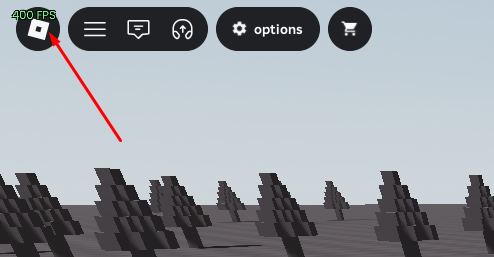
Simple FPS counter for any Roblox game. Color-coded, smooth display. Works on Xeno and most executors.
Script code
local cfg = {
    pos = "TopLeft",
    pad = 12,
    size = 16,
    color = Color3.fromRGB(255, 255, 255),
    low = Color3.fromRGB(255, 80, 80),
    mid = Color3.fromRGB(255, 210, 80),
    hi = Color3.fromRGB(120, 255, 140),
    lowAt = 30,
    midAt = 60,
    smooth = 0.15,
}

if not Drawing then return end

local RS = game:GetService("RunService")
local fps = 60
local last = os.clock()
local frames = 0

local txt = Drawing.new("Text")
txt.Size = cfg.size
txt.Outline = true
txt.Center = false
txt.Transparency = 1
txt.Visible = true

local function color(v)
    if v < cfg.lowAt then return cfg.low end
    if v < cfg.midAt then return cfg.mid end
    return cfg.hi
end

local function place()
    local cam = workspace.CurrentCamera
    if not cam then return end
    local v = cam.ViewportSize
    if cfg.pos == "TopRight" then
        txt.Position = Vector2.new(v.X - cfg.pad - 60, cfg.pad)
    elseif cfg.pos == "BottomLeft" then
        txt.Position = Vector2.new(cfg.pad, v.Y - cfg.pad - cfg.size)
    elseif cfg.pos == "BottomRight" then
        txt.Position = Vector2.new(v.X - cfg.pad - 60, v.Y - cfg.pad - cfg.size)
    else
        txt.Position = Vector2.new(cfg.pad, cfg.pad)
    end
end

RS.RenderStepped:Connect(function()
    frames += 1
    local now = os.clock()
    if now - last >= 0.25 then
        local cur = frames / (now - last)
        fps += (cur - fps) * cfg.smooth
        frames = 0
        last = now
        txt.Text = math.floor(fps + 0.5) .. " FPS"
        txt.Color = color(fps)
        txt.Size = cfg.size
    end
    place()
end)
Long script — expand to view syntax highlighting
Discussion
0 / 20Log in to join the discussion.
No comments yetBe the first to ask a question or leave feedback.
Universal FPS Counter Script | Open Source